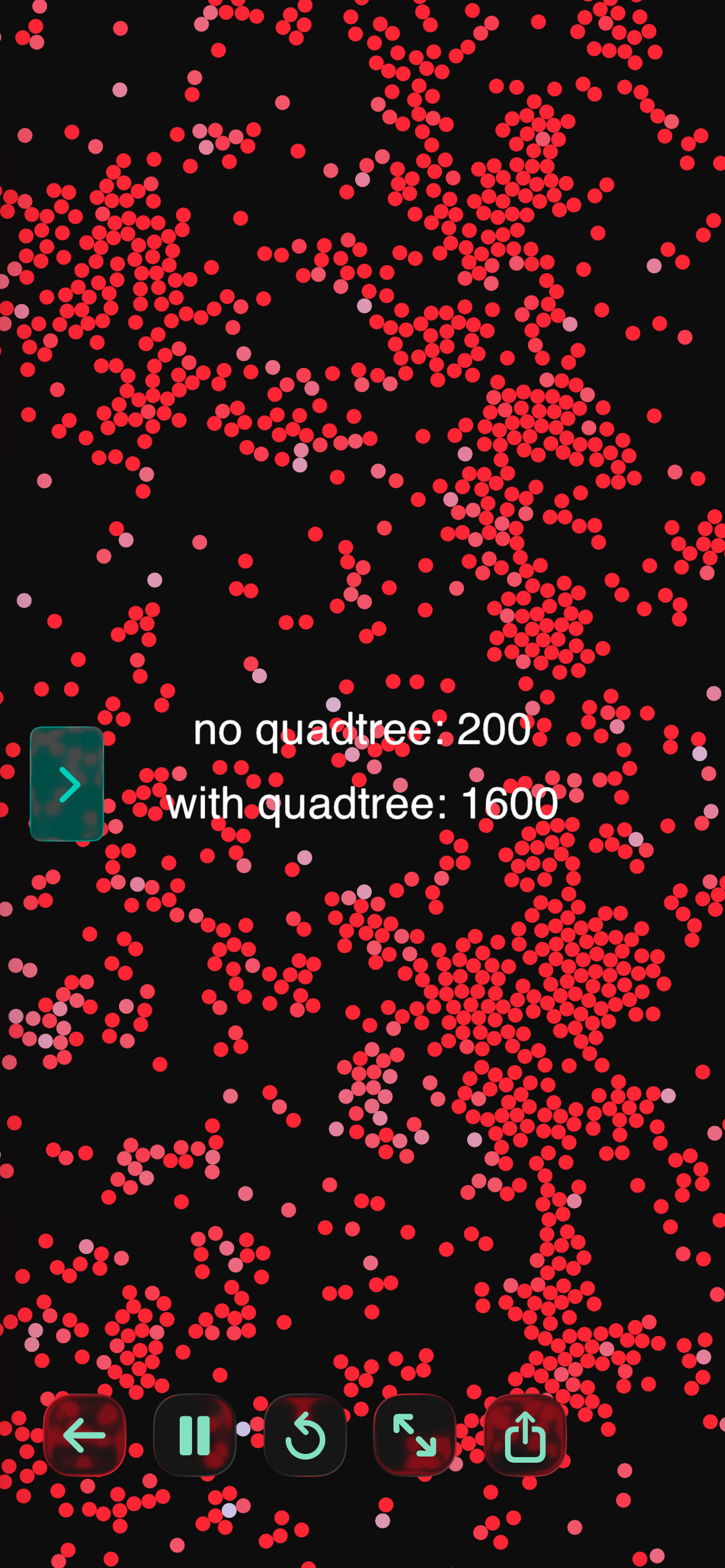
Vibe-coded this demo for you on my 16e. Dramatic difference!
Does the demo use this the way you intended?
-- Quadtree vs Brute Force — Neighbor Query Benchmark (tap-driven)
--
-- Real Box2D physics.body(CIRCLE) bodies handle all movement and
-- collision in both phases, identically. The only thing under
-- test is HOW we answer an extra per-frame query -- "which other
-- bodies are within QUERY_RADIUS of this one" -- using either a
-- brute-force O(n^2) scan or the quadtree.
--
-- The query result is visual only (body color = neighbor count).
-- Nothing feeds back into physics, so both phases simulate the
-- same kind of workload without the query influencing motion.
--
-- Needs Quadtree.lua (CircFinder / RectFinder / Quadtree) in the
-- same project.

function setup()
  physics.gravity(0, 0)

  bodies = {}
  QUERY_RADIUS = 30
  spawnBatch = 100
  rampInterval = 0.5
  fpsFloor = 24

  -- states: "readyBaseline", "runningBaseline",
  --         "readyQuadtree",  "runningQuadtree", "done"
  state = "readyBaseline"

  rampTimer = 0
  smoothedFPS = 60
  baselineResult = nil
  quadtreeResult = nil
end

function spawnBodies(n)
  for i = 1, n do
    local b = physics.body(CIRCLE, 4)
    b.x = math.random(0, WIDTH)
    b.y = math.random(0, HEIGHT)
    b.linearVelocity = vec2(math.random(-80, 80), math.random(-80, 80))
    b.restitution = 0.9
    b.neighborCount = 0
    table.insert(bodies, b)
  end
end

function resetBodies()
  for _, b in ipairs(bodies) do
    b:destroy()
  end
  bodies = {}
end

function boundBodies()
  for _, b in ipairs(bodies) do
    if b.x < 0 or b.x > WIDTH then
      b.linearVelocity = vec2(-b.linearVelocity.x, b.linearVelocity.y)
    end
    if b.y < 0 or b.y > HEIGHT then
      b.linearVelocity = vec2(b.linearVelocity.x, -b.linearVelocity.y)
    end
    b.x = math.max(0, math.min(WIDTH, b.x))
    b.y = math.max(0, math.min(HEIGHT, b.y))
  end
end

-- Visual-only neighbor queries: tag each body with how many
-- others are within QUERY_RADIUS. No force applied, so physics
-- motion is unaffected by which method is used.

function proximityBruteForce()
  for _, b in ipairs(bodies) do
    local count = 0
    for _, other in ipairs(bodies) do
      if other ~= b then
        local dx = b.x - other.x
        local dy = b.y - other.y
        local d2 = dx * dx + dy * dy
        if d2 < QUERY_RADIUS * QUERY_RADIUS then
          count = count + 1
        end
      end
    end
    b.neighborCount = count
  end
end

function proximityQuadtree()
  local qt = Quadtree(0, 0, WIDTH, HEIGHT, 8, 0, 6)
  for _, b in ipairs(bodies) do
    qt:insert({ x = b.x, y = b.y, radius = 4, ref = b })
  end

  local range = CircFinder(0, 0, QUERY_RADIUS)
  for _, b in ipairs(bodies) do
    range.x = b.x
    range.y = b.y
    local nearby = qt:query(range)
    local count = 0
    for _, entry in ipairs(nearby) do
      if entry.ref ~= b then
        count = count + 1
      end
    end
    b.neighborCount = count
  end
end

function runRamp(proximityFn, onFail)
  local dt = DeltaTime
  smoothedFPS = smoothedFPS * 0.9 + (1 / dt) * 0.1

  boundBodies()
  proximityFn()

  rampTimer = rampTimer + dt
  if rampTimer >= rampInterval then
    rampTimer = 0
    if smoothedFPS >= fpsFloor then
      spawnBodies(spawnBatch)
    else
      onFail(#bodies - spawnBatch)
    end
  end
end

function touched(touch)
  if touch.state == BEGAN then
    if state == "readyBaseline" then
      state = "runningBaseline"
      smoothedFPS = 60
      rampTimer = 0
      spawnBodies(spawnBatch)
    elseif state == "readyQuadtree" then
      state = "runningQuadtree"
      smoothedFPS = 60
      rampTimer = 0
      spawnBodies(spawnBatch)
    end
  end
end

function draw()
  background(15, 15, 20)

  if state == "runningBaseline" then
    runRamp(proximityBruteForce, function(result)
      baselineResult = result
      resetBodies()
      state = "readyQuadtree"
    end)
  elseif state == "runningQuadtree" then
    runRamp(proximityQuadtree, function(result)
      quadtreeResult = result
      state = "done"
    end)
  end

  noStroke()
  for _, b in ipairs(bodies) do
    local n = b.neighborCount or 0
    local t = math.min(n / 8, 1)  -- clamp: color maxes out around 8 neighbors
    fill(200 + t * 55, 220 - t * 180, 255 - t * 200)
    ellipse(b.x, b.y, 8)
  end

  fill(255)
  fontSize(24)

  if state == "readyBaseline" then
    text("tap for table-iterating test\ncolor reddens with # of neighbors\nstops below 25 fps", WIDTH/2, HEIGHT/2)
  elseif state == "runningBaseline" then
    text("running table-iterating test...", WIDTH/2, HEIGHT - 40)
    text("bodies: " .. #bodies .. "   fps: " .. string.format("%.1f", smoothedFPS), WIDTH/2, HEIGHT - 70)
  elseif state == "readyQuadtree" then
    text("no quadtree result: " .. baselineResult, WIDTH/2, HEIGHT/2 + 40)
    text("tap for quadtree test\ncolor reddens with # of neighbors\nstops below 25 fps", WIDTH/2, HEIGHT/2)
  elseif state == "runningQuadtree" then
    text("running quadtree test...", WIDTH/2, HEIGHT - 40)
    text("bodies: " .. #bodies .. "   fps: " .. string.format("%.1f", smoothedFPS), WIDTH/2, HEIGHT - 70)
  elseif state == "done" then
    text("no quadtree: " .. baselineResult, WIDTH/2, HEIGHT/2 + 40)
    text("with quadtree: " .. quadtreeResult, WIDTH/2, HEIGHT/2)
  end
end