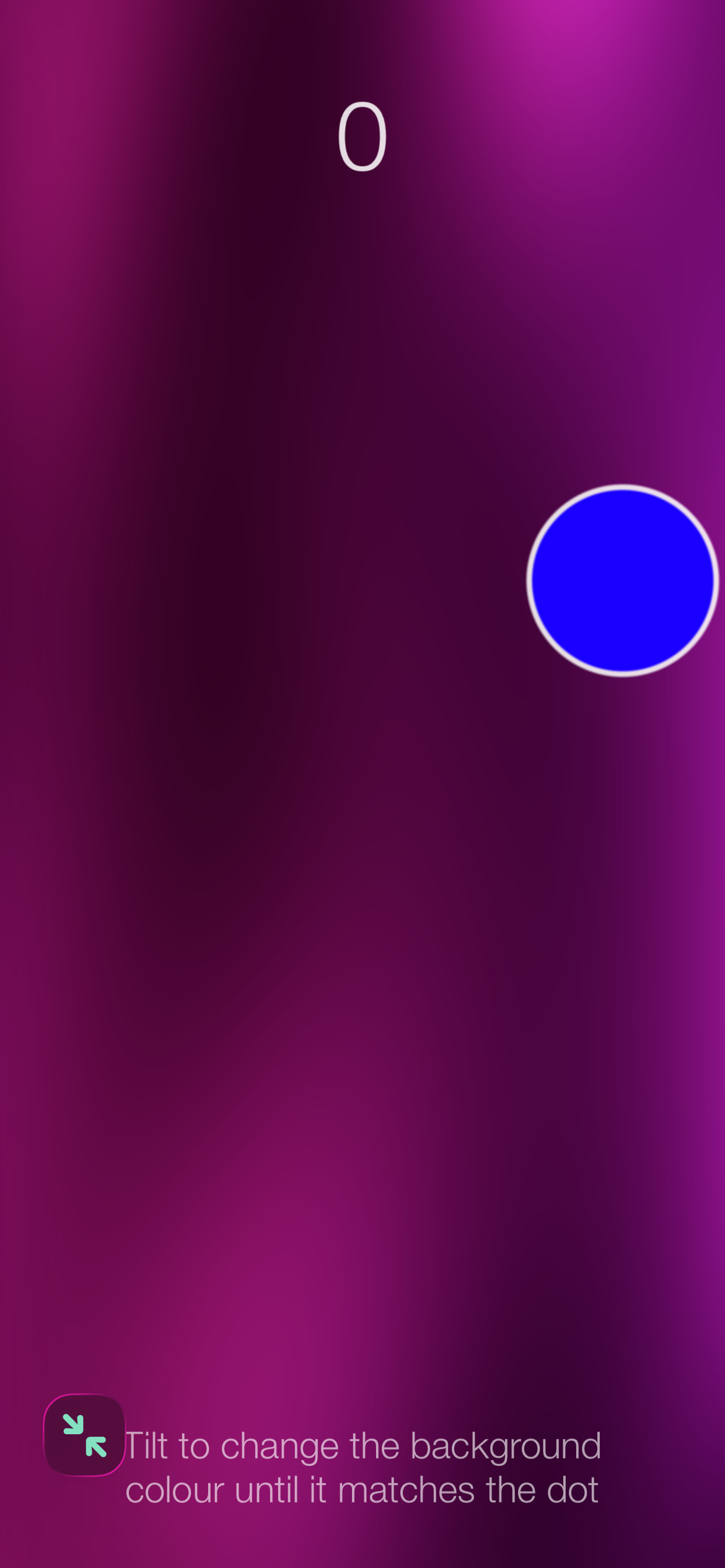
Tilt the phone/pad and the background changes color. Try to match the color to the bouncing dot.
It’s simple, dumb, and a little fun. What more you want? 
Code:
-- Gyro Colour Match
-- Codea Legacy 3.x

-- ── Tuning ──────────────────────────────────────────────────
local MATCH_THRESHOLD = 4
local CLOSE_THRESHOLD = 45
local HOLD_TIME       = 3.0
local BALL_SPEED      = 100
local BALL_RADIUS     = 55
local FLASH_DUR       = 0.8

-- ── State ───────────────────────────────────────────────────
local ball      = {}
local score     = 0
local matchTime = 0
local flashTime = 0
local bgMesh    = nil
local lastW, lastH = 0, 0

-- ── Mesh setup ───────────────────────────────────────────────
function setupBgMesh()
  bgMesh = mesh()
  bgMesh.vertices = {
    vec2(0, 0),     vec2(WIDTH, 0),     vec2(WIDTH, HEIGHT),
    vec2(0, 0),     vec2(WIDTH, HEIGHT), vec2(0, HEIGHT)
  }
  bgMesh.texCoords = {
    vec2(0, 0),     vec2(1, 0),         vec2(1, 1),
    vec2(0, 0),     vec2(1, 1),         vec2(0, 1)
  }
  bgMesh:setColors(255, 255, 255, 255)
  bgMesh.shader = shader(vertSrc, fragSrc)
  lastW, lastH = WIDTH, HEIGHT
end

-- ── Entry points ─────────────────────────────────────────────
function setup()
  viewer.mode = FULLSCREEN
  newBall()
end

function draw()
  -- Landscape guard
  if WIDTH > HEIGHT then
    background(30, 30, 30)
    fill(255, 255, 255, 200)
    font("HelveticaNeue-Light")
    fontSize(28)
    textAlign(CENTER)
    text("Please use portrait mode for this game", WIDTH / 2, HEIGHT / 2)
    return
  end

  -- Build or rebuild mesh on first run or after orientation change
  if WIDTH ~= lastW or HEIGHT ~= lastH then
    setupBgMesh()
  end

  local angle = math.atan(Gravity.x, Gravity.y)
  local bgHue = (math.deg(angle) + 180) % 360

  -- Shader background replaces background()
  bgMesh.shader.time = ElapsedTime
  bgMesh.shader.hue  = bgHue / 360.0
  bgMesh:draw()

  moveBall()
  checkMatch(bgHue)
  drawBall()
  drawHUD()
end

-- ── Ball ─────────────────────────────────────────────────────
function newBall()
  ball.x   = WIDTH  / 2
  ball.y   = HEIGHT / 2
  local a  = math.random() * math.pi * 2
  ball.vx  = math.cos(a) * BALL_SPEED
  ball.vy  = math.sin(a) * BALL_SPEED
  ball.hue = math.random(0, 359)
  matchTime = 0
end

function moveBall()
  ball.x = ball.x + ball.vx * DeltaTime
  ball.y = ball.y + ball.vy * DeltaTime

  if ball.x < BALL_RADIUS then
    ball.x = BALL_RADIUS; ball.vx = math.abs(ball.vx)
  elseif ball.x > WIDTH - BALL_RADIUS then
    ball.x = WIDTH - BALL_RADIUS; ball.vx = -math.abs(ball.vx)
  end
  if ball.y < BALL_RADIUS then
    ball.y = BALL_RADIUS; ball.vy = math.abs(ball.vy)
  elseif ball.y > HEIGHT - BALL_RADIUS then
    ball.y = HEIGHT - BALL_RADIUS; ball.vy = -math.abs(ball.vy)
  end
end

-- ── Match logic ───────────────────────────────────────────────
function checkMatch(bgHue)
  local diff = math.abs(bgHue - ball.hue)
  if diff > 180 then diff = 360 - diff end
  ball.diff    = diff
  ball.isMatch = diff < MATCH_THRESHOLD

  if ball.isMatch then
    matchTime = matchTime + DeltaTime
    if matchTime >= HOLD_TIME then
      score     = score + 1
      flashTime = FLASH_DUR
      ball.hue  = math.random(0, 359)
      matchTime = 0
    end
  else
    matchTime = math.max(0, matchTime - DeltaTime * 1.5)
  end
end

-- ── Drawing ───────────────────────────────────────────────────
function drawBall()
  local pulse = 1 + 0.05 * math.sin(ElapsedTime * 3)
  local r     = BALL_RADIUS * pulse
  local diff  = ball.diff

  -- Glow when matched
  if ball.isMatch and matchTime > 0 then
    local alpha = 70 + 110 * (matchTime / HOLD_TIME)
    fill(255, 255, 255, alpha)
    noStroke()
    ellipse(ball.x, ball.y, (r + 22) * 2)
  end

  -- Proximity-driven border thickness
  local borderWidth
  if diff >= CLOSE_THRESHOLD then
    borderWidth = 3
  else
    local t = 1 - (diff / CLOSE_THRESHOLD)
    borderWidth = 3 + t * 10
  end

  fill(hsvToRgb(ball.hue, 1.0, 1.0))
  stroke(255, 255, 255, 220)
  strokeWidth(borderWidth)
  ellipse(ball.x, ball.y, r * 2)

  -- Progress ring
  if matchTime > 0 then
    local progress = matchTime / HOLD_TIME
    local ringR    = r + 18
    local steps    = 64
    local filled   = math.floor(progress * steps)
    stroke(255, 255, 255, 240)
    strokeWidth(5)
    for i = 0, filled - 1 do
      local a1 = math.rad(i       / steps * 360 - 90)
      local a2 = math.rad((i + 1) / steps * 360 - 90)
      line(
      ball.x + ringR * math.cos(a1),
      ball.y + ringR * math.sin(a1),
      ball.x + ringR * math.cos(a2),
      ball.y + ringR * math.sin(a2)
      )
    end
  end
end

function drawHUD()
  textAlign(CENTER)
  font("HelveticaNeue-Light")
  fontSize(52)
  fill(255, 255, 255, 220)
  text(score, WIDTH / 2, HEIGHT - 72)

  if flashTime > 0 then
    flashTime = flashTime - DeltaTime
    local alpha = (flashTime / FLASH_DUR) * 255
    fill(255, 255, 255, alpha)
    fontSize(70)
    text("+1", WIDTH / 2, HEIGHT - 150)
  end

  if score == 0 and matchTime == 0 and flashTime == 0 then
    fill(255, 255, 255, 160)
    fontSize(20)
    textWrapWidth(WIDTH * 0.8)
    text("Tilt to change the background colour until it matches the dot", WIDTH / 2, 55)
  end
end

-- ── Colour utility ────────────────────────────────────────────
function hsvToRgb(h, s, v)
  h = h % 360
  local i = math.floor(h / 60) % 6
  local f = (h / 60) - math.floor(h / 60)
  local p = v * (1 - s)
  local q = v * (1 - f * s)
  local t = v * (1 - (1 - f) * s)
  local r, g, b
  if     i == 0 then r, g, b = v, t, p
  elseif i == 1 then r, g, b = q, v, p
  elseif i == 2 then r, g, b = p, v, t
  elseif i == 3 then r, g, b = p, q, v
  elseif i == 4 then r, g, b = t, p, v
  elseif i == 5 then r, g, b = v, p, q
  end
  return r * 255, g * 255, b * 255
end


-- ── Shaders ─────────────────────────────────────────────────
vertSrc = [[
attribute vec4 position;
attribute vec2 texCoord;
varying highp vec2 vUV;
uniform mat4 modelViewProjection;

void main() {
  vUV = texCoord;
  gl_Position = modelViewProjection * position;
}
]]

-- Balatro-style: three-pass domain warp, layered sine brightness,
-- dark base with luminous organic bands in the target hue.
fragSrc = [[
precision highp float;
varying highp vec2 vUV;
uniform float time;
uniform float hue;

vec3 hsvToRgb(float h, float s, float v) {
vec4 K = vec4(1.0, 2.0/3.0, 1.0/3.0, 3.0);
vec3 p = abs(fract(vec3(h) + K.xyz) * 6.0 - K.www);
return v * mix(K.xxx, clamp(p - K.xxx, 0.0, 1.0), s);
}

void main() {
float t = time * 0.22;
vec2 p = vUV;

// Domain warp — same three passes
p += 0.13 * vec2(sin(2.9 * p.y + 1.6 * t), cos(2.6 * p.x + 1.2 * t));
p += 0.07 * vec2(sin(5.1 * p.y + 2.0 * t + 1.1), cos(4.5 * p.x + 1.7 * t + 0.9));
p += 0.03 * vec2(sin(9.3 * p.y + 3.1 * t + 2.3), cos(8.1 * p.x + 2.7 * t + 1.5));

// More octaves at varied frequencies and phases so no single
// region dominates. Weights sum to 1.0.
float n = 0.30 * (sin(p.x *  4.5 + p.y *  2.8 + t * 1.0       ) * 0.5 + 0.5);
n      += 0.22 * (sin(p.x *  2.7 - p.y *  6.3 + t * 0.6       ) * 0.5 + 0.5);
n      += 0.18 * (sin(p.x *  7.8 + p.y *  4.4 - t * 1.4       ) * 0.5 + 0.5);
n      += 0.15 * (sin(p.x * 11.3 - p.y *  3.1 + t * 1.8 + 0.7 ) * 0.5 + 0.5);
n      += 0.10 * (sin(p.x *  6.1 + p.y *  9.4 - t * 0.9 + 1.3 ) * 0.5 + 0.5);
n      += 0.05 * (sin(p.x * 14.7 - p.y *  7.2 + t * 2.2 + 2.1 ) * 0.5 + 0.5);

// Gentler power curve — keeps mid-range bright enough to form
// multiple streaks rather than one dominant dark center
float band = pow(n, 1.4);

float h = hue + 0.035 * sin(p.x * 2.5 + t * 0.8);
float s = 0.80 + 0.18 * (1.0 - band);
float v = 0.10 + 0.75 * band;

vec3 col = hsvToRgb(h, s, v);
gl_FragColor = vec4(col, 1.0);
}
]]