Hi there,
I’m in trouble to manage dependancies (require()), while using working copy for managing my remote GitHub repo.
My Git Repo is simple :
MyProject
|_ myProject.codea (2)
|_ myLib.codea
On my iPad,
iCloud/Codea-MyProject/
|_ myProject.codea (1)
|_ myLib.codea
I created a synched directory on working copy.
myProject.codea.file1
myProject.codea.file2
…
myLib.codea.fileA
myLib.codea.fileB
which is the exact and sync version of iCloud/Codea-MyProject
I’m able to click on (1), edit, make changes in Codea. Changes are mirored in working copy. I can then Commit and Push to my repo.
Using a navigator, I see the impact on my git repo.
Great !
But how to manage dependancies ?
The first line of myProject.codea.file1 is
require(asset.iCloud.myLib)
myLib is supposed to be part of Codea internal files located in iCloud/Codea/ … is there a way to point to external directory ?
Did I missed something ? How to you proceed your side to manage your repo with working copy (in case of projects with dependancies) ?
As require() cannot point to external directories (other than iCloud/Codea and Documents/Codea)
I changed the way to incorporate working copy in my workflow
1/ I keep locate all the .codea projects locally on my iPad (GitHub will be the central point for sharing sources, not iCloud)
→ then On my iPad,
     /Codea/
        |_ myProject.codea
        |_ myLib.codea
2/ Working Copy connected to my git hub repo
3/ Working Copy synched with Codea AND .gitignore to include only the files from my project that are relative to my project (Codea might include myOtherProject.codea and myOtherLib.codea which I don’t expect to manage in GitHub).
Cheers
Content of .gitignore file :
# ignore all by default
*

# projects to include
!lib_Win.codea/
!lib_Win.codea/**

!lib_NNet.codea/
!lib_NNet.codea/**

!lib_File.codea/
!lib_File.codea/**

!lib_unit_tests.codea/
!lib_unit_tests.codea/**

!lib_MNIST.codea/
!lib_MNIST.codea/**

# parameters of the application to include
!NNET_PARAMS/
!NNET_PARAMS/**

# learning weights to exclude (20260715-222907-99_40pct.json)
JOURNAL/2026*
JOURNAL/2027*

# learning weights to include (WEIGHT-20x20-25-10.json)
!JOURNAL/
!JOURNAL/**

# exclude external references
MNIST-Origin/
Hey sorry for replying to this late, I was going to let you know how to use external directories.
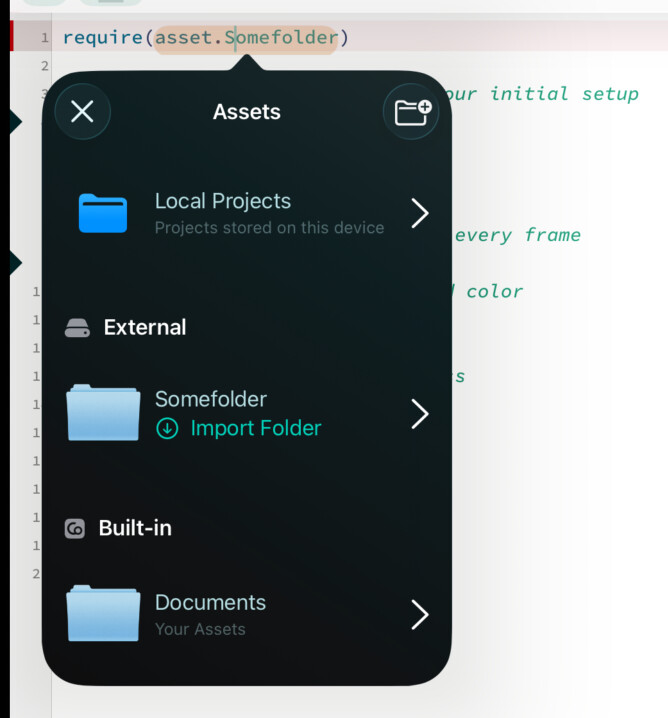
When you tap on the require() picker, you’ll see a folder icon with a + in the top right (see screenshot). If you tap on that you will see an option to “Add Folder” (reference an external folder)
You can then select a folder located anywhere on your iPad that contains .codea projects, then you can require them through asset.ExternalFolderName.project
For external folders you can store the in iCloud, or locally (“On My iPad / On My iPhone”) — you can put them inside the Codea folder, but that’s not how the feature is supposed to be used (because that would just be the same as require(asset.documents.someProject) / require(asset.icloud.someProject))
I put my lib within a subfolder within Codea directory. require(asset.documents.mySubFolder.myLib)
The advantage is that the subfolder appears within the main UI panel of Codea (at the bottom of the panel).
I also test to put the subfolder elsewhere. require(asset.mySubfolder.myLib). But 1/ it is less convenient to access the lib for any change. 2/ I’m not sure but launching the app that access to the myLib in this case seems way longer/slower.