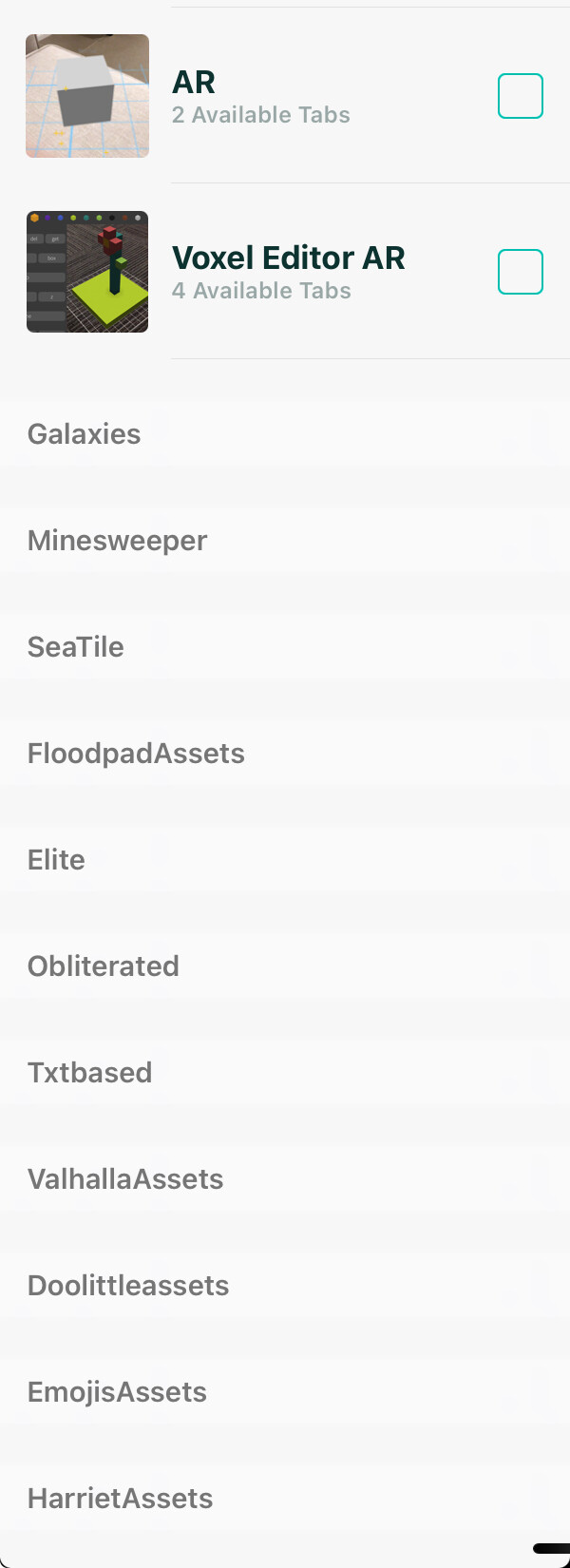
@jfperusse - another funny, could be down to me loading old files but - I loaded several files that I had zipped and stored externally. I have been adjusting them over a couple of beta updates. Several of them show up on the iPad Codea projects as an icon but when you tap on dependencies they don’t show up with an icon in the dependencies list. They do show up however as grey text entries at the bottom of the dependencies list.
Have you changed the file type or some other recognisable label which is excluding these. Image of list at the bottom of dependencies attached.
By the way, is there any way, in the dependencies window, of tapping a section heading and collapsing the section to minimise the need for scrolling ? When tapping the section heading the section expands to view the projects held their.
Edit: Just thought could this be to do with the icon.png or icon@2X.png that are generated in new projects that have captured images?
@sim@john@jfperusse - just noticed another funny in the beta. I was trying to add a project, which was visible in the main project list, as a dependency. But it was not visible in the pull down dependency selection list. I have 40 projects in my project list but only 25 showed up in the dependency selection list. There were 14 text based files in faint grey font in the dependency list below the icon section. These are present because I have a number of folders in the Codea root (see the attached graphic on the post above).
For a project to show up in the Dependencies window, it must have at least file other than Main.lua. This is because we only import those other files, not Main.lua.
Is it possible your new project only has a Main tab?
In the latest beta it appears the text() function doesn’t work from within a coroutine. As my Codea+ library runs everything inside of coroutines by default (for debugger functionality) all of WebRepo’s text rendering is performed in a coroutine.
function setup()
    co = coroutine.create(function()
        while true do
            print("text() in coroutine...")
            text("Hello from coroutine.", WIDTH/2, 200)
            coroutine.yield()
        end
    end)
end

function draw()
    fill(255)

    -- Works
    text("Hello from main thread.", WIDTH/2, 100)

    -- Does not work
    coroutine.resume(co)
end
I do have a simple workaround (call text from the main thread instead) but that does add additional overhead that I’d prefer to avoid usually.
I’m aware of quite a few similar cases to this where certain API functions do not work from coroutines. Is there a reason for this?

 )
)