Ok I moved a ton of stuff out so I only have about 10 projects that Codea can see now.
I’ll let you know if problems recur.
Ok I moved a ton of stuff out so I only have about 10 projects that Codea can see now.
I’ll let you know if problems recur.
Problems recur, sorry to say.
I just lost the entire project I was working on again. Fortunately I had it backed up.
This is with those hundreds of other projects moved out of the Codea folder, and only about 10 on the main page.
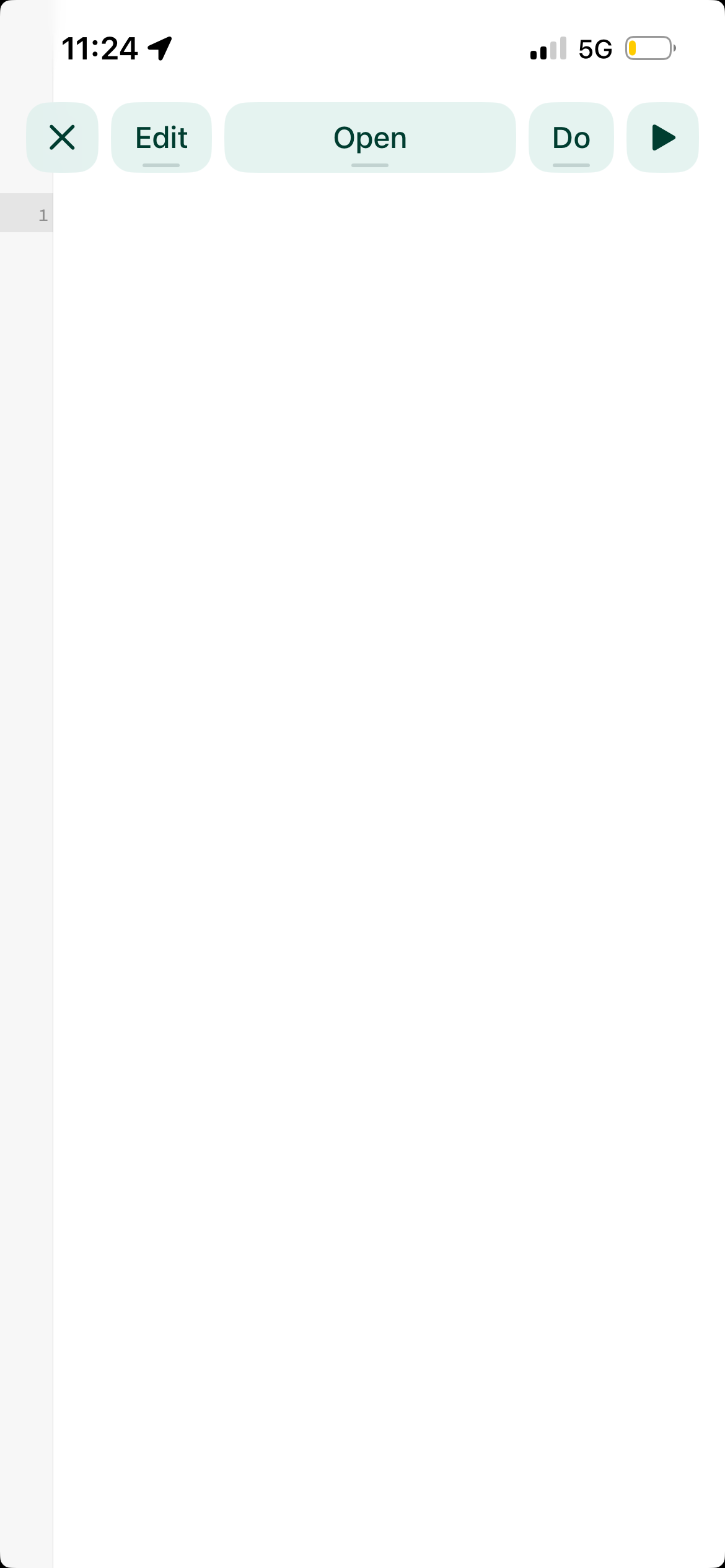
About an hour before this happened I also got this screen on opening the project:
When you tap on the word Open it shows there are no other tabs. So it looks like everything’s gone, but it isn’t.
See, I’ve actually seen this a few times in the past, and closing the project and re-opening it seems to fix it, and it fixed it this time too. The project opened with all its tabs.
Is this related to the bug where a project is completely wiped off the Home Screen? I don’t know, can’t say. But those two things didn’t happen together, fwiw, it was at least an hour apart.
Thanks. Trying to narrow this down and your details are helpful. Investigating whether it might have something to do with the asset browser
I think I’m onto something. Looks like there is a leak when opening projects. Hopefully fixed next build.
I will say there may be some kind of low RAM situation happening, because every time I switch to Claude it opens as if it has self-terminated while in the background.
Normally it can keep track of what chat I’m in while in the background, but currently when I go to Codea and do some stuff and then switch back to Claude I almost always see the loading screen and then the blank chat screen.
To me that looks like an app shutting itself down in the background from low RAM. Not sure though. iPhone 16e, about 3 gigs free space.
I’ve found and fixed an issue that may be responsible for this (depending on your usage). There was a memory leak introduced that caused the whole document — whatever document you open — to stick around in memory after you close it. So if you opened-and-closed Codea projects they would slowly accumulate and eat all your memory to the point where Codea might behave erratically if you were low on RAM.
Next build fixes this, hoping it helps the issue but will keep looking as well!
Anybody,
Please refresh my memory (duuuhmmm dementia setting in) - what are the best options for pasting projects, or project code, on this forum ?
There’s the three tildes (~~~) before and after the code which make it format correctly inside a post.
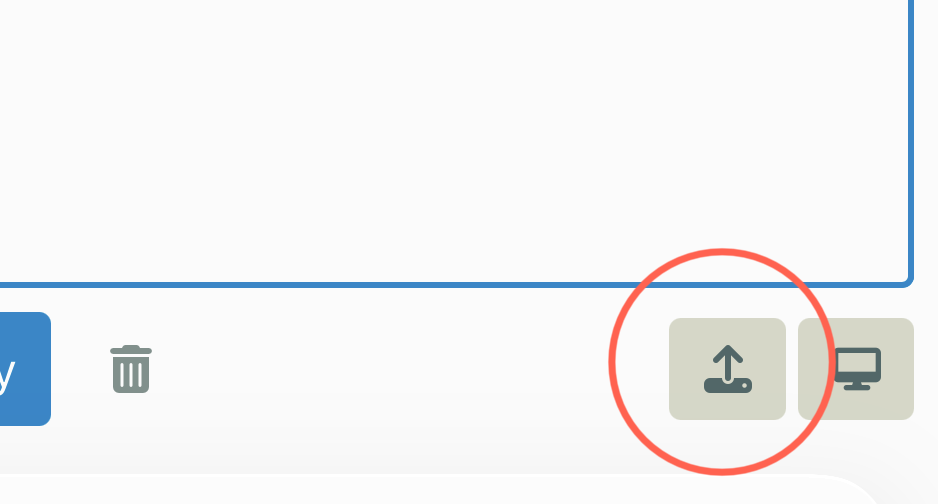
And there’s the little upload widget thingy at the lower right of the text-entry window when you’re writing a post or responding to one.
And you can use the WebRepo app too depending on what you’re posting. If it’s a completed project and too large to put on the forums directly WebRepo is the way to go.
Are any of those what you were looking for?
@UberGoober - thanks for that, going to attach a project, my first with ChatGPT, for a fireworks display which has several iterations building up in complexity - after a while the screen freezes and Codea crashes. My first thoughts it was due to too high a demand on the iPad hardware or rapidly running out of memory.
@sim - you may be able to trace the fault.
~~~
-- V3 template
viewer.mode = FULLSCREEN
fireworks = {}
particles = {}
stars = {}
gravity = vec2(0,-0.11)
airDrag = 0.986
time = 0
finale = false
--========================
– Setup
–========================
function setup()
viewer.mode = FULLSCREEN
viewer.showStats = false
-- starfield
for i=1,120 do
    table.insert(stars,{
        x = math.random(WIDTH),
        y = math.random(HEIGHT),
        s = math.random(1,3),
        tw = math.random()
    })
end
end
--========================
– Draw
–========================
function draw()
time = time + DeltaTime
drawSky()

-- finale trigger
if time > 20 then
    finale = true
end

-- normal show
if not finale and math.random() < 0.02 then
    launchFirework(math.random(WIDTH))
end

-- finale mode (dense launches)
if finale then
    for i=1,4 do
        launchFirework(math.random(WIDTH))
    end
end

updateFireworks()
drawFireworks()
end
function touched(t)
if t.state == BEGAN then
launchFirework(t.x)
end
end
--========================
– Sky + stars
–========================
function drawSky()
– gradient
for y=0,HEIGHT,8 do
local t = y/HEIGHT
fill(10t,10t,30 + 50*t)
rect(0,y,WIDTH,8)
end
-- stars
for _,s in ipairs(stars) do
    local twinkle = math.sin(ElapsedTime*2 + s.tw*10)*0.5+0.5
    fill(255,255,255,150*twinkle)
    ellipse(s.x,s.y,s.s)
end
end
--========================
– Launch
–========================
function launchFirework(x)
table.insert(fireworks,{
    pos = vec2(x,0),
    vel = vec2(math.random(-2,2),math.random(12,16)),
    exploded = false,
    col = randomColor()
})
end
function randomColor()
return color(
math.random(150,255),
math.random(150,255),
math.random(150,255)
)
end
--========================
– Explosion (perfect sphere)
–========================
function explode(f)
local count = 140

for i=1,count do

    -- golden angle for uniform sphere
    local phi = math.acos(1 - 2*(i/count))
    local theta = math.pi * (1 + math.sqrt(5)) * i

    local dir = vec2(
    math.cos(theta)*math.sin(phi),
    math.sin(theta)*math.sin(phi)
    )

    local speed = 4 + math.random()*2

    spawnParticle(f.pos,
    dir*speed,
    math.random(90,120),
    f.col,
    4,
    true,
    true
    )
end
end
--========================
– Particle factory
–========================
function spawnParticle(pos,vel,life,col,size,sparkle,trail)
table.insert(particles,{
    pos = vec2(pos.x,pos.y),
    vel = vel,
    life = life,
    maxLife = life,
    col = col,
    size = size,
    sparkle = sparkle,
    trail = trail
})
end
--========================
– Update
–========================
function updateFireworks()
-- rockets
for i=#fireworks,1,-1 do

    local f = fireworks[i]

    if not f.exploded then

        -- bright trail
        spawnParticle(f.pos,
        vec2(math.random(-1,1)*0.5,math.random(-1,0)),
        30,
        color(255,200,120),
        3,
        false,
        false
        )

        f.vel = f.vel + gravity
        f.pos = f.pos + f.vel

        if f.vel.y <= 0 then
            f.exploded = true
            explode(f)
        end

    else
        table.remove(fireworks,i)
    end
end

-- particles
for i=#particles,1,-1 do

    local p = particles[i]

    p.vel = p.vel * airDrag
    p.vel = p.vel + gravity * 0.2
    p.pos = p.pos + p.vel

    p.life = p.life - 1

    -- trailing embers
    if p.trail and math.random() < 0.3 then
        spawnParticle(p.pos,
        vec2(math.random(-1,1)*0.3,math.random(-1,1)*0.3),
        20,
        p.col,
        2
        )
    end

    if p.life <= 0 then
        table.remove(particles,i)
    end
end
end
--========================
– Draw (additive glow)
–========================
function drawFireworks()
blendMode(ADDITIVE)

for _,p in ipairs(particles) do

    local t = p.life / p.maxLife

    local r = p.col.r * t
    local g = p.col.g * t
    local b = p.col.b * t

    local alpha = 255 * t

    -- core glow
    fill(r,g,b,alpha)
    ellipse(p.pos.x,p.pos.y,p.size*1.5)

    -- bright center
    fill(255,255,255,alpha*0.6)
    ellipse(p.pos.x,p.pos.y,p.size*0.6)
end

blendMode(NORMAL)
end
aspect = checkAspect()
sW, sH, cW, cH = WIDTH, HEIGHT, WIDTH//2, HEIGHT//2
touched = {}
print(aspect)
end
local check = WIDTH/HEIGHT
if check ~= aspect then
sW, sH, cW, cH = WIDTH ,HEIGHT, WIDTH//2, HEIGHT//2
aspect = WIDTH/HEIGHT
check = aspect
end
return check
end
~~~
Something odd here, post not formatted properly a the gizmo you mentioned seemed to be working but I couldn’t attach the project. You may be able to recover the code from this post with a little cut and pasting.
Ignore the last two functions, there general code I use from a separate tab.
p.s. the ~~~ tildes didn’t seem to work right.
Let me know if the latest build, 616, improves the situation
@sim since the crash I am now on build 3.17(611).
Test
Test
Test
…huh. Don’t know what to tell you. That’s the tildes at work right there.
Here’s your exact code post:
\-- V3 template

viewer.mode = FULLSCREEN
fireworks = {}
particles = {}
stars = {}

gravity = vec2(0,-0.11)
airDrag = 0.986

time = 0
finale = false

\--========================
– Setup
–========================

function setup()
viewer.mode = FULLSCREEN
viewer.showStats = false

```
-- starfield
for i=1,120 do
    table.insert(stars,{
        x = math.random(WIDTH),
        y = math.random(HEIGHT),
        s = math.random(1,3),
        tw = math.random()
    })
end

```

end

\--========================
– Draw
–========================

function draw()
time = time + DeltaTime

```
drawSky()

-- finale trigger
if time > 20 then
    finale = true
end

-- normal show
if not finale and math.random() < 0.02 then
    launchFirework(math.random(WIDTH))
end

-- finale mode (dense launches)
if finale then
    for i=1,4 do
        launchFirework(math.random(WIDTH))
    end
end

updateFireworks()
drawFireworks()

```

end

function touched(t)
if t.state == BEGAN then
launchFirework(t.x)
end
end

\--========================
– Sky + stars
–========================

function drawSky()
– gradient
for y=0,HEIGHT,8 do
local t = y/HEIGHT
fill(10*t,10*t,30 + 50\*t)
rect(0,y,WIDTH,8)
end

```
-- stars
for _,s in ipairs(stars) do
    local twinkle = math.sin(ElapsedTime*2 + s.tw*10)*0.5+0.5
    fill(255,255,255,150*twinkle)
    ellipse(s.x,s.y,s.s)
end

```

end

\--========================
– Launch
–========================

function launchFirework(x)

```
table.insert(fireworks,{
    pos = vec2(x,0),
    vel = vec2(math.random(-2,2),math.random(12,16)),
    exploded = false,
    col = randomColor()
})

```

end

function randomColor()
return color(
math.random(150,255),
math.random(150,255),
math.random(150,255)
)
end

\--========================
– Explosion (perfect sphere)
–========================

function explode(f)

```
local count = 140

for i=1,count do

    -- golden angle for uniform sphere
    local phi = math.acos(1 - 2*(i/count))
    local theta = math.pi * (1 + math.sqrt(5)) * i

    local dir = vec2(
    math.cos(theta)*math.sin(phi),
    math.sin(theta)*math.sin(phi)
    )

    local speed = 4 + math.random()*2

    spawnParticle(f.pos,
    dir*speed,
    math.random(90,120),
    f.col,
    4,
    true,
    true
    )
end

```

end

\--========================
– Particle factory
–========================

function spawnParticle(pos,vel,life,col,size,sparkle,trail)

```
table.insert(particles,{
    pos = vec2(pos.x,pos.y),
    vel = vel,
    life = life,
    maxLife = life,
    col = col,
    size = size,
    sparkle = sparkle,
    trail = trail
})

```

end

\--========================
– Update
–========================

function updateFireworks()

```
-- rockets
for i=#fireworks,1,-1 do

    local f = fireworks[i]

    if not f.exploded then

        -- bright trail
        spawnParticle(f.pos,
        vec2(math.random(-1,1)*0.5,math.random(-1,0)),
        30,
        color(255,200,120),
        3,
        false,
        false
        )

        f.vel = f.vel + gravity
        f.pos = f.pos + f.vel

        if f.vel.y <= 0 then
            f.exploded = true
            explode(f)
        end

    else
        table.remove(fireworks,i)
    end
end

-- particles
for i=#particles,1,-1 do

    local p = particles[i]

    p.vel = p.vel * airDrag
    p.vel = p.vel + gravity * 0.2
    p.pos = p.pos + p.vel

    p.life = p.life - 1

    -- trailing embers
    if p.trail and math.random() < 0.3 then
        spawnParticle(p.pos,
        vec2(math.random(-1,1)*0.3,math.random(-1,1)*0.3),
        20,
        p.col,
        2
        )
    end

    if p.life <= 0 then
        table.remove(particles,i)
    end
end

```

end

\--========================
– Draw (additive glow)
–========================

function drawFireworks()

```
blendMode(ADDITIVE)

for _,p in ipairs(particles) do

    local t = p.life / p.maxLife

    local r = p.col.r * t
    local g = p.col.g * t
    local b = p.col.b * t

    local alpha = 255 * t

    -- core glow
    fill(r,g,b,alpha)
    ellipse(p.pos.x,p.pos.y,p.size*1.5)

    -- bright center
    fill(255,255,255,alpha*0.6)
    ellipse(p.pos.x,p.pos.y,p.size*0.6)
end

blendMode(NORMAL)

```

end

## function init()

aspect = checkAspect()
sW, sH, cW, cH = WIDTH, HEIGHT, WIDTH//2, HEIGHT//2
touched = {}
print(aspect)
end

## function checkAspect()

local check = WIDTH/HEIGHT
if check \~= aspect then
sW, sH, cW, cH = WIDTH ,HEIGHT, WIDTH//2, HEIGHT//2
aspect = WIDTH/HEIGHT
check = aspect
end
return check
end
…when I cut and pasted it here your tildes pasted as “\~\~\~” and you’ll notice there are odd ‘\’ characters scattered in the rest of the code too. I don’t know why that happened or if it has anything to do with it.
@UberGoober - before I posted the code I opened the edit window then posted three sequential tildes in a line, added several blank lines then added a further three tildes - to enable pasting code in-between the tildes. It looked fine when I’d finished it before I posted it.
But - I’m not sure adding the tildes like that is allowed.
I can’t see any tilde editing functions in the editing symbols at the top of the posting window - am I approaching this the wrong way ?
I was surprised to see tildes distributed throughout the code - very rarely use them.
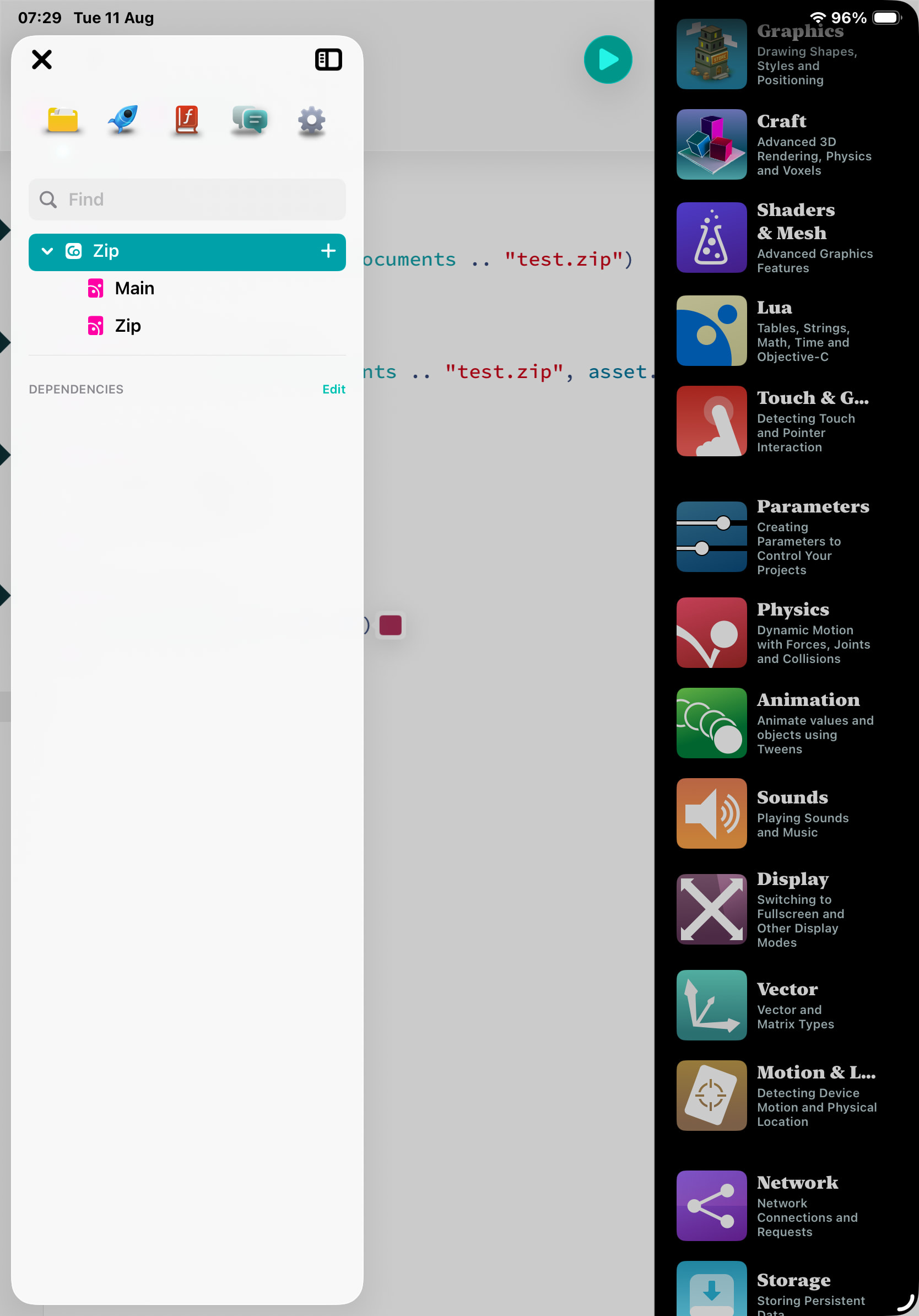
@sim - just downloaded latest beta and, after a few attempts to feed back and issue unsuccessfully I managed to post an image which showed a totally different editing screen with several unusable icons on it with no apparent configuration options also, it loaded straight into this editor screen with a project window on display. Posted an image hope that helps.
The image I posted did not appear in the post above, it looked like a different interface for reporting bugs. Captured image of one of the Codea accessible pages and posting here - @sim is this an early version of Codea or a new version - doesn’t handle well and doesn’t respond to attempts to get to established editing screen.
What on earth! How did you access that version of the editor!! 
@Bri_G that is an early beta version of the next editor and I hadn’t made it available. But somehow it’s opened up on your device. Looking into it
I copy/pasted your code from your post to my demonstration version. Some of the weird formatting and characters probably come from doing that—as you saw the code in your post had odd formatting all over the place so that’s what got copied.
@sim - I also fed the error back on an error reporting page which I haven’t seen before. Has error reporting been incorporated within Codea itself ?
@sim - thanks for the update, latest version now installed. The Fireworks still sends a crash error - it builds in complexity and slows down. When the screen is heavily full of stars and updates are still seen but slow - I closed the project but on entering the editor screen Codea crashed.