SODA with Stacks.zip (1.9 MB)
I’d like to propose this as an official update to Soda and get people’s takes on it.
I think the under the hood stuff and the iPhone compatibility stuff might warrant calling this a version 0.8?
This is what the version notes would be:
Version Notes
v0.8
Five big changes this release, plus a handful of smaller ones listed at the end.
NEW Soda.Stack — automatic layout
Positioning children of a Frame by hand — computing x/y/w/h in pixels for every button in a panel, then redoing it whenever something’s added or removed — has always been a challenging part of building with Soda. Soda.Stack helps make it easier.
Give a stack a dir ("v" or "h"), a gap, and however many children you like, and it lays them out automatically along that axis, using each child’s own flex weight and selfAlign, plus the stack’s own justify (main-axis) and align (cross-axis) settings, to fill the available space. Padding is set with pad, or individually with padLeft/padRight/padTop/padBottom.
A Soda.Stack is a subclass of Soda.Frame, so it accepts every normal Frame parameter directly — title, preset, styling, and so on —meaning it doesn’t need to be wrapped in a root Frame, it can itself be the root Frame. One Soda.VStack{ title = "Settings", preset = "panel", gap = 8, ... } is a complete titled panel, on its own.
Shorthands and companions:
Soda.VStack/Soda.HStack— thin wrappers that setdirfor youSoda.Grid— uniform-cell grid layout (cols,rowGap,colGap,fit = "natural" | "fill"), for icon grids and similarSoda.Spacer{ flex = 1 }— an invisible, flexible filler, for pushing siblings apart
Defaults to align = "fill", which will override anything with genuinely fixed geometry (eg Soda.Switch’s fixed-width track) — give those children selfAlign = "start" or "center" explicitly. See the Stack tab for full details and caveats, and Overview for worked examples throughout every tab.
NEW Standardizer — optional two-slot constructor shorthand
The table-style constructor format is great for flexibility but has drawbacks too and the Standardizer syntax is made to address a few of those. There are a couple crucial pieces of information for every Soda object, namely its parent and its xywh specifications, and Standardizer syntax is intended to give them guaranteed positions in the parameter table. But just as important as having consistent positions, compelling explicit nil statements for each of those values can save a large amount of time.
If for example a Soda constructor has only a definition for the y value, you’re going to have to read the constructor over at least once and maybe more times to be sure the other values aren’t hiding in there somewhere. Standardizer syntax compels xywh to be given as a single table, with explicit nils in the positions that aren’t specified. In short, for an object’s parents and xywh values, it is very useful to have “not defined” be an explicit setting, not something one has to infer.
Every Soda constructor now accepts geometry as two leading positional arguments, ahead of the usual named-parameter table: a parent (or nil), then an {x, y, w, h} table (or nil), with everything else as named keys same as always. This turns the common case from
Soda.Button{
    parent = myPanel,
    x = 0, y = -10, w = 120, h = 40,
    title = "OK"
}
into
Soda.Button{
    myPanel,
    {0, -10, 120, 40},
    title = "OK"
}
Fully-named calls — the classic style — still work exactly as before, and the two styles can be freely mixed within the same project or even the same tab. Standardizer detects which form a given call is using and normalises it internally, so nothing that currently builds on Soda needs to change to keep working.
Also introduced alongside this: preset — a shorthand for common bundles of shape/subStyle/shapeArgs. preset = "panel" gives you the standard rounded, translucent panel background used throughout Overview, without repeating the same three attributes on every panel.
See the Standardizer tab for the full conversion rules.
NEW iPhone compatibility
The Layout tab now adapts every element to phone-sized screens as well — a Layout.isPhone flag (gated by a fixed minimum-dimension threshold, not a continuous scale, so iPad geometry never drifts), separate portrait and landscape branches, adjusted safe-area insets, scaled font sizes, and per-orientation window sizing throughout. The Overview demo now fully adapts across all 8 tabs in phone portrait and phone landscape, not just on iPad.
The adaptive helpers this introduced are available to any project building on Soda, not just Overview: Layout.isPhone, Layout.isPortrait, Layout.titleBand(), Layout.buttonW(), Layout.fitText(), Layout.dialogW()/Layout.dialogH(), and more — see the Layout tab.
NEW dynamic (“live”) blurred panels
This one’s been on the Roadmap since early versions: blurred panels (blurred = true) used to be baked once, at the moment they were declared, and never updated — so they’d look wrong if anything visible beneath them later moved.
The Blur tab has been rewritten: instead of baking a small blur per element, Soda now bakes one full-screen blur behind everything, and each blurred element just crops a window out of that shared image — repositioning a panel (eg dragging a window) costs nothing but moving the crop, no rebake needed. A rebake happens automatically whenever the content underneath could actually have changed: any show/hide/orientation change invalidates every live blur, and dragging a top-level element invalidates every blur stacked above it (via the new Soda.Blur.markDirtyAbove()). This is also what makes the new :bringToFront() method (see Other changes, below) actually pay off cleanly for blurred, draggable windows.
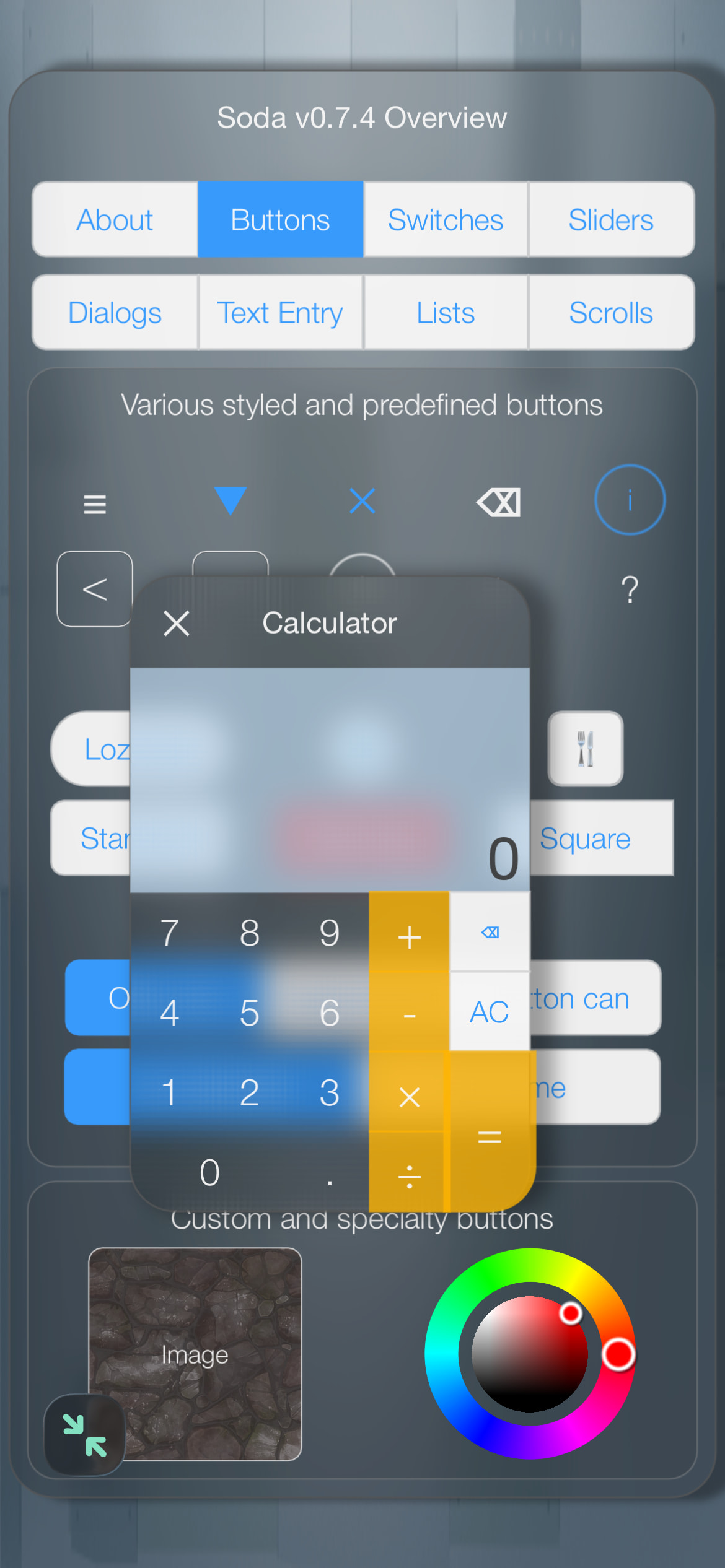
NEW Soda.ColorWheel
An HSB color picker — a hue ring plus a saturation/brightness square disc, each with its own draggable thumb. Sized like any other Soda element: pass equal w and h, and the wheel is inscribed in that square.
Attributes:
hue- number, 0-360 (degrees)sat,bri- number, 0-100 (percent)
Methods:
:color()- returns the wheel’s current value as a Codeacolor():setFromColor(c)- seeds the wheel’s hue/sat/bri from an existing color, if the host project supplies an RGB→HSV helper (_rgb2hsv); a no-op otherwise
See it live in the Buttons tab of Overview.
Other changes
Frame’s fallback size when neitherwnorhis given is now1.0/1.0(fill parent) instead of the old0.4/0.3— matters mainly inside aStack, where an unspecified child size is common and is meant to mean “fill”.Frame/Scrollgained amodalflag (alongside the existingalertflag) that swallows touches outside the element without darkening the screen — used for dismiss-on-outside-tap popups such as dropdown lists.- New
Frame:bringToFront()method reorders an element to the front of its sibling list, so it draws and receives touches above everything else. Soda.DropdownListpopups are properly sized and positioned now: they open below the button by default, flip to open above it when there isn’t room below, and size against the real screen rather than whatever small container the button happens to be laid out in.